

Tracking the right SEO metrics is crucial for understanding how well your website is performing in search engines and identifying areas for improvement.
This guide provides you with the essential SEO metrics to keep an eye on.
What SEO Metrics Should I Track?
| Metric | Description | Why It Matters |
|---|---|---|
| Organic Traffic | The number of visitors from search engines. | Indicates overall SEO health and reach. |
| Keyword Rankings | Positions of your site in search results for specific keywords. | Reflects visibility for relevant searches. |
| Click-Through Rate (CTR) | Percentage of people clicking your site after seeing it in search results. | Measures how compelling your listings are. |
| Bounce Rate | Percentage of visitors who leave after viewing only one page. | Can indicate content relevance or user experience issues. |
| Page Load Time | Time taken for your pages to fully load. | Affects user experience and can influence rankings. |
| Backlinks | Number and quality of other sites linking to yours. | Act as endorsements, improving site credibility and ranking potential. |
| Mobile Responsiveness | How well your site performs on mobile devices. | Essential for user experience and ranking, especially after Google’s mobile-first indexing. |
| Conversion Rate | Percentage of visitors who complete a desired action (e.g., sign-up, purchase). | Shows the effectiveness of your site in achieving business objectives beyond just attracting traffic. |
Let’s dive in.
10 Important SEO Metrics to Track
1. Organic Traffic
Organic traffic refers to website visitors who arrive through unpaid search engine results. It’s the lifeblood of SEO efforts, representing users who discover your site naturally through search queries.
Using GA4? Read this guide.
- Monitor Organic Traffic Volume: Most website analytics platforms like Google Analytics will have a section dedicated to traffic sources. Here, you can track the total number of visitors coming from organic search. Look for trends over time to see if your SEO strategy is increasing organic traffic.
- Identify Top Organic Keywords: Analytics tools will also reveal which keywords are driving the most organic traffic to your site. This helps you understand what search terms people are using to find you and allows you to focus your SEO efforts on those keywords.
- Track Organic Ranking for Target Keywords: It’s important to monitor your website’s ranking for the specific keywords you’re targeting in your SEO strategy. Tools like Google Search Console or SEMrush can help you track your ranking position over time. Aiming for higher rankings in search results pages (SERPs) for relevant keywords will naturally increase organic traffic.
2. Keyword Clicks
Keyword clicks are a subset of organic traffic specifically referring to instances where users see your website listed in search results for a particular keyword and then click on it to visit your site.
- Monitor Click-Through Rate (CTR): This metric represents the percentage of users who see your website in search results for a specific keyword and decide to click on it. A high CTR indicates your title tags and meta descriptions are compelling and accurately reflect the content users are looking for. Tools like Google Search Console and SEO tools like SEMrush or Ahrefs will provide CTR data for your organic keywords.
- Analyze CTR by Keyword: Don’t just look at overall CTR. Dig into the data to see which keywords have high or low CTRs. This helps you identify areas for improvement. For example, a low CTR for a high-volume keyword might indicate a need to optimize your title tag and meta description for that specific term to make it more enticing to click.
- Track CTR Over Time: Monitor how CTR for your target keywords changes over time. Ideally, you want to see a steady increase or at least consistent performance. A significant drop in CTR might indicate that a recent algorithm update or competitor activity has impacted your search result visibility.
This data helps you refine your title tags, meta descriptions, and overall content strategy to improve click-through rates and ultimately drive more qualified organic traffic to your website.
3. Organic Conversions
Organic conversions refer to instances where visitors who arrive at your website through search engines (organic traffic) take a desired action, signifying the success of your SEO efforts in driving valuable user engagement.
Most website analytics platforms like Google Analytics allow you to set up conversion goals and track how visitors from organic search contribute to achieving those goals.
Track organic conversions:
- Define Conversion Goals: Identify the actions you consider valuable conversions for your website.
- Set Up Conversion Tracking: Use your analytics platform’s tools to configure tracking for each conversion goal. This often involves adding code snippets to your website or setting up goals within the platform.
- Analyze Organic Conversion Data: Once tracking is set up, your analytics will report how many organic visitors complete your desired conversions. This data allows you to calculate your organic conversion rate, which is the percentage of organic visitors who convert.
4. Keyword Rankings
Keyword rankings refer to the position your website holds in search engine results pages (SERPs) for specific keywords. It’s a fundamental metric in SEO as it indicates how visible your website is for the search terms most relevant to your target audience.
Free Tool: KWD Rangings.
Two main approaches to tracking keyword rankings:
- Manual Tracking: You can simply search for your target keywords in a search engine and see what position your website appears in the results. However, this method is time-consuming and impractical for tracking a large number of keywords.
- SEO Tools: Most SEO tools offer keyword rank tracking features. These tools allow you to enter a list of keywords and they will automatically track your website’s ranking position for those terms over time. Popular options include:
- Google Search Console (Free): Offers limited keyword ranking data but can be a good starting point.
- SEMrush
- Ahrefs
- Moz
5. Backlinks
Backlinks are links from other websites that point to your website. They act as a vote of confidence for your site in the eyes of search engines and can significantly influence your website’s ranking in search results pages (SERPs).
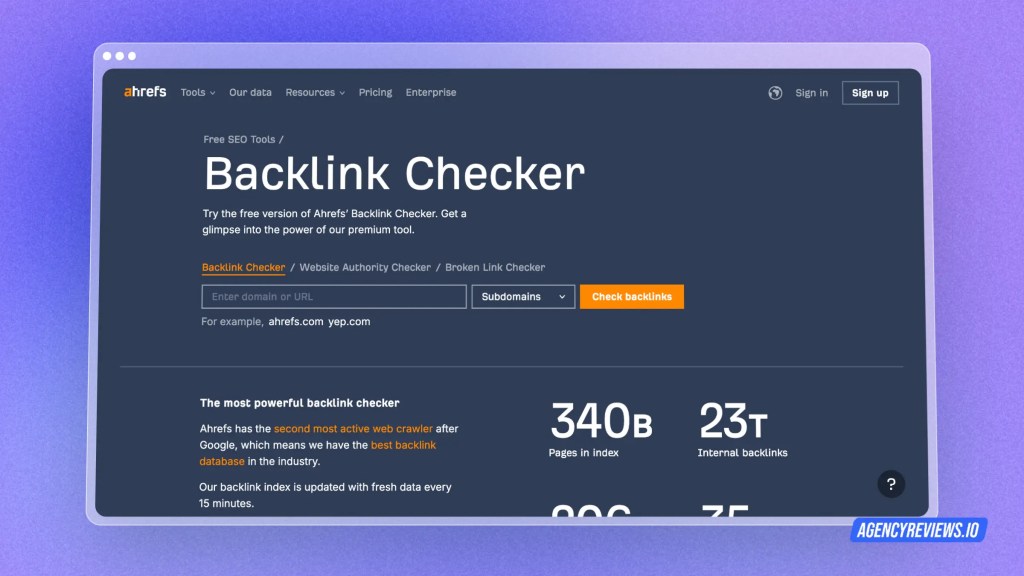
There are several ways to track backlinks:
- Google Search Console (Free): This free tool from Google offers basic backlink data, including a list of websites linking to yours.
- SEO Tools: Most SEO tools provide comprehensive backlink tracking features. These tools allow you to see a detailed breakdown of your backlink profile, including:
- The number of backlinks you have
- The domains linking to you
- The anchor text used in the backlinks
- The quality score of the linking domains
6. Local SEO
Local SEO visibility specifically refers to how prominent your business appears in search results for local searches. This is crucial for businesses that rely on attracting customers within a specific geographic area, like brick-and-mortar stores, restaurants, or local service providers.
There are several ways to track local SEO visibility:
- Local Map Pack Rankings: This refers to the prominent business listings displayed on Google Maps for local searches. Tools like Moz Local, Whitespark, and Search Monitor allow you to track your ranking position within the local map pack for relevant keywords.
- Organic Search Rankings for Local Keywords: Track your ranking for local search terms that include your city, neighborhood, or surrounding area. Google Search Console or keyword tracking tools can help you monitor these rankings.
- Online Review Monitoring: Track the number and sentiment of online reviews across platforms like Google My Business, Yelp, and Facebook. Positive reviews can significantly boost your local SEO visibility and attract more customers.
- Local Business Directory Listings: Monitor how your business information is listed across local directories and citation websites. Ensure your NAP (Name, Address, Phone number) consistency across all platforms.
7. Page Speed
In SEO, page speed refers to how quickly your website content loads for users. It’s a crucial factor for user experience and can also indirectly influence your website’s ranking in search results.
- Google PageSpeed Insights: This free tool from Google analyzes your website’s speed on desktop and mobile and provides specific recommendations for improvement.
- GTmetrix: Another popular free tool offering website speed testing and detailed performance reports.
- Pingdom Website Speed Test: Another free option that analyzes page speed and offers actionable insights.
- Paid SEO Tools: Many SEO tools, like SEMrush or Ahrefs, offer website speed tracking features as part of their broader suite of functionalities.
8. Mobile Traffic
Mobile traffic now makes up a significant portion of all website visits, so monitoring your mobile performance is crucial for SEO success. Here’s how to track mobile traffic and rankings and optimize your website for mobile users.
Tracking Mobile Traffic
- Google Analytics: Most analytics platforms like Google Analytics allow you to segment your traffic data by device. This lets you see how much traffic comes specifically from mobile devices compared to desktops and tablets.
- Mobile-Specific Reports: Look for reports dedicated to mobile traffic within your analytics platform. These reports can provide insights into user behavior on mobile devices, such as average session duration, bounce rate, and popular landing pages for mobile visitors.
Tracking Mobile Rankings
- Mobile-Specific Keyword Tracking: Many SEO tools offer the ability to track keyword rankings specifically for mobile search results. This allows you to see how your website ranks for relevant keywords when users search from their smartphones.
- Google Search Console: While Google Search Console primarily shows desktop rankings by default, you can use the “Mobile Usability” report to identify mobile-specific SEO issues that might be impacting your rankings.
9. Engagement
Engagement metrics are vital for understanding how visitors interact with your website beyond simply landing on a page. They provide valuable insights into user behavior and content effectiveness, ultimately helping you refine your SEO strategy to attract and retain a captivated audience.
Through Google Analytics:
- Time on Page & Pages per Session: Navigate to Behavior > Site Content > All Pages. Here, you’ll see average time on page and average pages per session for each webpage on your site.
- Bounce Rate: In the same report (Behavior > Site Content > All Pages), you’ll find the bounce rate listed for each webpage.
- Internal Linking: While Google Analytics doesn’t directly show how often users click internal links, you can analyze user flow reports (Behavior > Behavior Flow) to understand how users navigate through your website and identify potential areas for strategic internal linking.
Conclusion
That’s it — you’ve just learned how to track SEO success!
Thank you for reading this,
Team AgencyReviews
 Agency Review Blogs
You must be logged in to post a comment.